

Every year The Staff Selection Commission announces thousands of vacancies through exams such as the SSC CGL, SSC CHSL, SSC MTS, and the SSC GD. There are many candidates who aspire to fill these government jobs, but many are unaware of the process and commit many avoidable mistakes while filling the form. This article will serve as a guide to the process, and you can follow the steps to fill the form accurately and correctly.
Note: a request to every ssc aspirant to read the full article before applying for the SSC exam.
What Is SSC Exams
The Staff Selection Commission, a central government organization, is responsible for recruiting candidates for Group B and Group C posts in various ministries, departments, and subordinate offices. The Commission conducts competitive exams for various qualification levels and positions, such as SSC CGL, SSC CHSL, SSC MTS, SSC GD, SSC JE, and SSC Stenographer. Each of these exams is released through a separate official notification, which contains information regarding eligibility, age, syllabus, and deadlines. Candidates must follow these guidelines when applying, as providing incorrect information or missing deadlines will result in disqualification from the ongoing recruitment process.
Step 1: Check the Official SSC Notification
Before applying, visit the official SSC website:
Download the latest notification for the specific exam you are targeting. Carefully review:
- Eligibility criteria (age, qualification)
- Age relaxation rules
- Application dates
- Exam pattern
- Selection process
- Application fee details
Do not rely solely on third-party websites. Always verify with the official source.
Step 2: Complete SSC One-Time Registration (OTR)
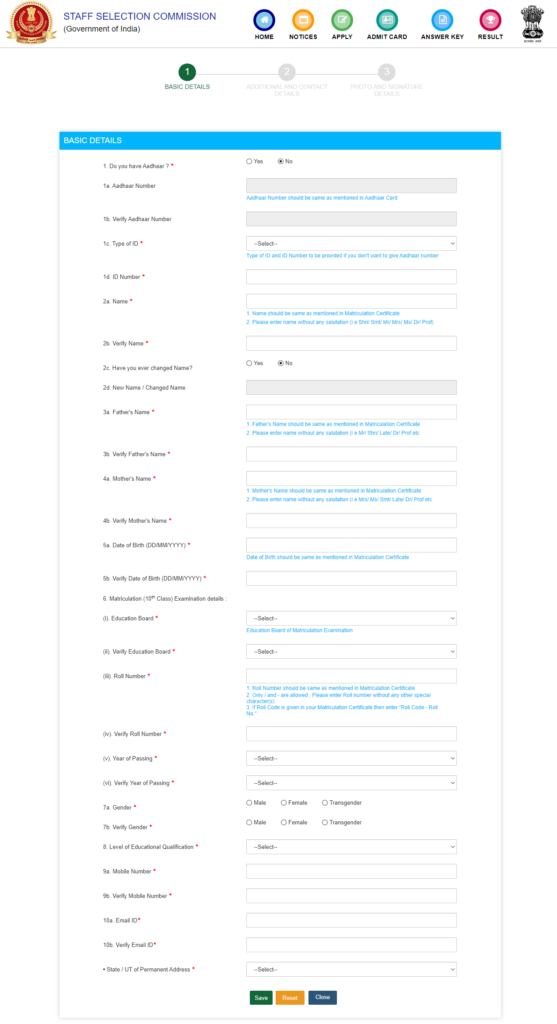
SSC now uses a One-Time Registration (OTR) system. If you are a new candidate, you must create your profile first.
Information Required for OTR:
- Aadhaar number (or alternative ID)
- Full name (as per matriculation certificate)
- Date of birth
- Educational qualification
- Mobile number and email ID
- Address details
After registration:
- You receive a registration number.
- Set a password.
- Verify your mobile and email via OTP.
Once OTR is complete, you do not need to repeat it for future SSC exams.
Step 3: Fill the SSC Application Form
After logging in with your registration ID:
- Click on “Apply” for the relevant exam.
- Select your preferred examination centers.
- Confirm your personal and academic details.
- Choose post preferences (if applicable).
- Upload required documents.
- Pay the application fee.
Step 4: Upload Documents in Correct Format
SSC has strict image specifications.
Photo Requirements:
- Recent passport-size photograph
- Light background
- JPEG format
- Size typically between 20–50 KB (check notification)
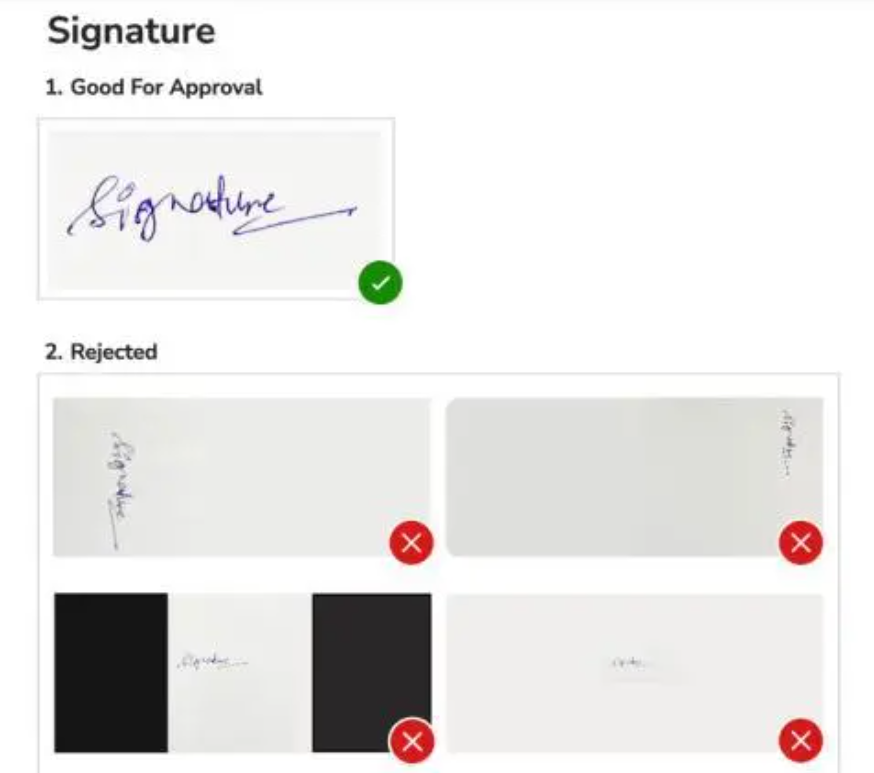
Signature Requirements:
- Clear signature in black/blue ink
- JPEG format
- Prescribed size limit
Incorrect image dimensions are one of the most common reasons for rejection.
Step 5: Final Submission and Printout
Before clicking “Final Submit”:
- Cross-check spelling of your name
- Verify date of birth
- Confirm category selection
- Recheck exam center choices
Once submitted, corrections may not be allowed (unless SSC opens a correction window).
Download:
- Application form PDF
- Payment receipt
Save them for future reference.
Application Fee (General Pattern)
- ₹100 for General/OBC candidates
- No fee for SC/ST/PwD Female candidates (varies by notification)
Payment methods:
- UPI
- Net banking
- Debit/Credit card
Common Mistakes to Avoid
- Entering incorrect name or date of birth (must match 10th certificate).
- Uploading blurred photographs.
- Missing the application deadline.
- Selecting exam centers randomly.
- Waiting until the last day (servers often slow down).
Operational discipline matters here.
Important Documents Checklist
After Applying: What’s Next?
Once your application is accepted:
- Monitor the website for admit card release.
- Download admit card from regional SSC website.
- Prepare according to the exam syllabus.
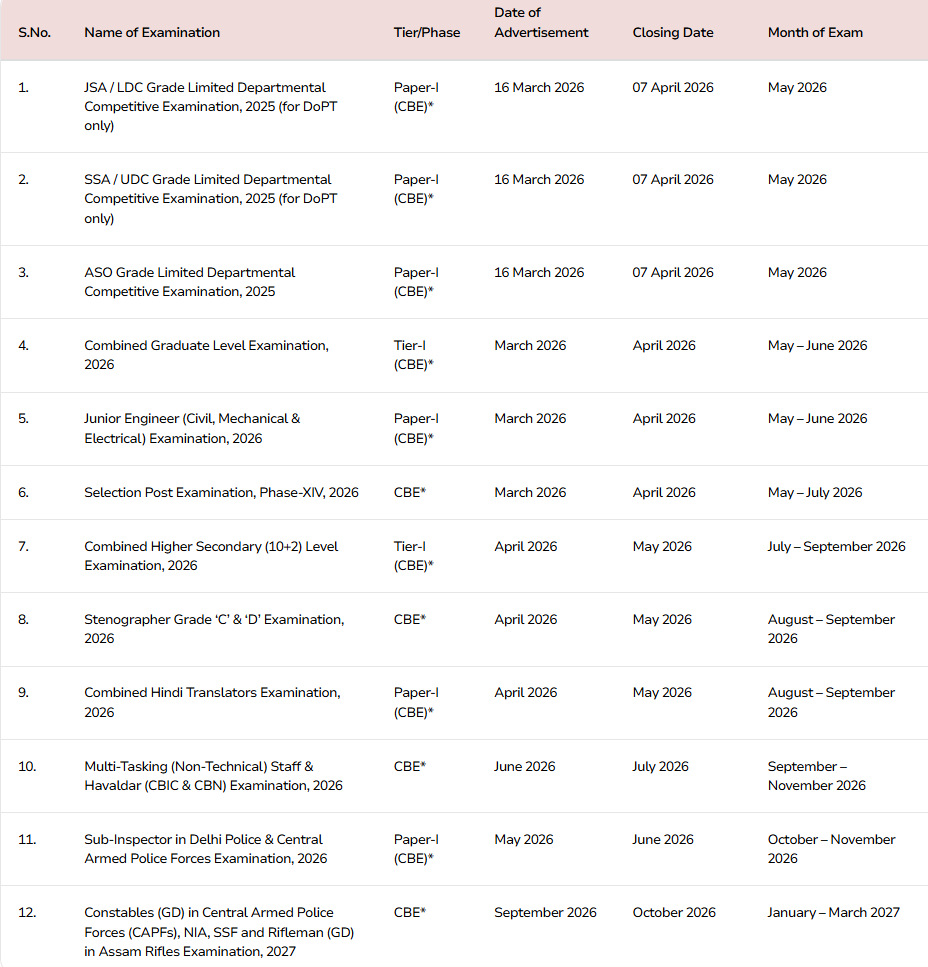
- Track exam dates via the SSC exam calendar.
Application is procedural. Selection depends entirely on preparation quality.
Frequently Asked Questions
Q. Can I apply for multiple SSC exams?
Yes, if you meet the eligibility criteria for each exam.
Q. Can I edit my SSC application form?
Only during the correction window (if provided).
Q. Is Aadhaar mandatory?
SSC prefers Aadhaar-based authentication, but alternatives are allowed as per notification.
Q. How many attempts are allowed?
There is no fixed attempt limit. Age eligibility applies.


Leave A Comment